Admins and members
Studio: 3 people included, up to 10. Organization: 5 included, no limit. More at $5 a month each.
A company can run several teams under one Organization: each team has its own projects and people, leadership sees all of it, and everyone in the company is in the contacts. Your studios and rooms are shared Spaces, and when two teams book the same one, or the same person, both hear about it.
Choose “Running a team?” when you sign up, or Account → Plan if you already have an account.
Name each team, pick its admin and move its projects in. Add your Spaces.
Pick yourcompany.proproduction.app, and your people sign in there.
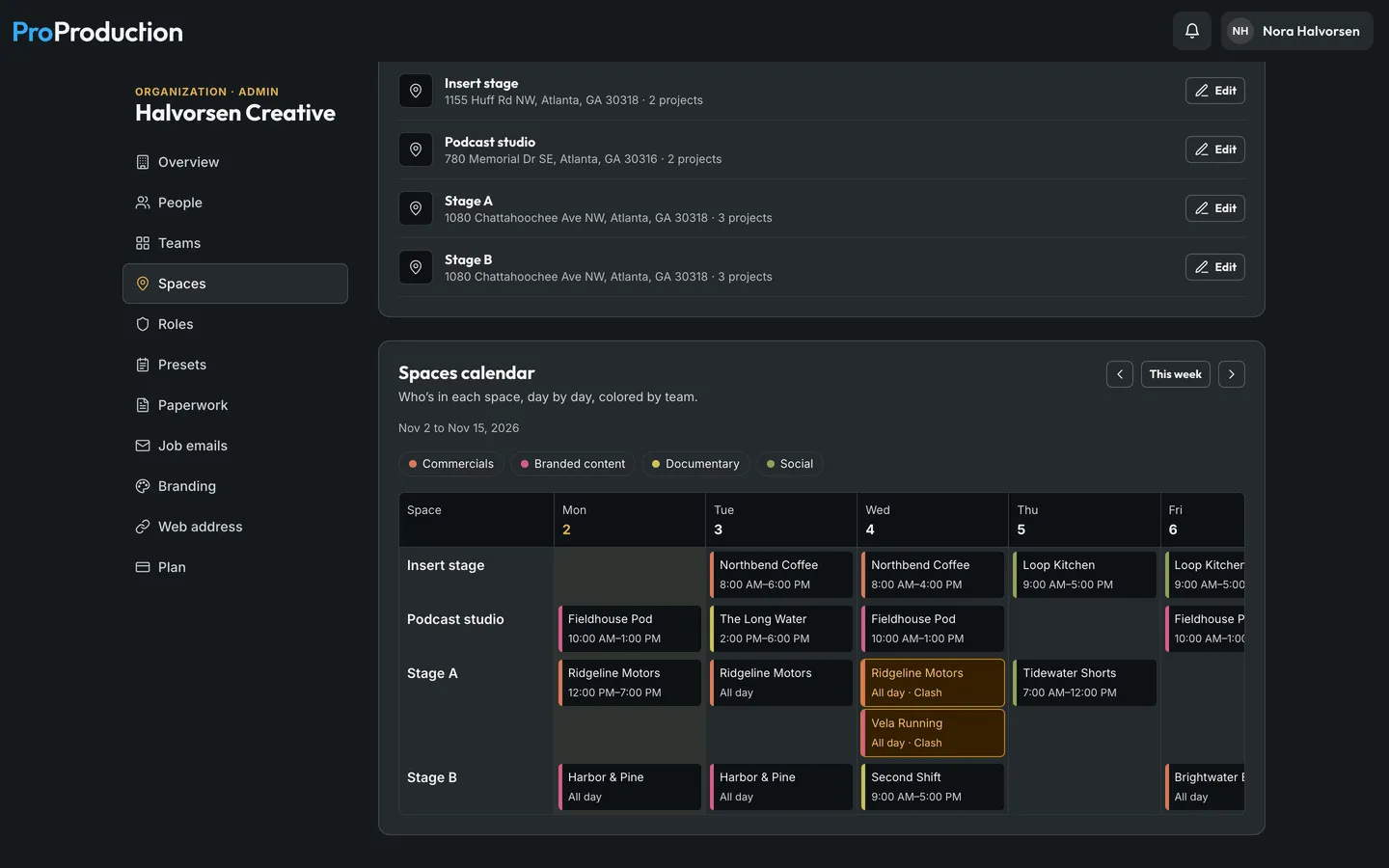
Spaces are your own studios, stages and rooms. A project adds one as a location, and the days that use it can say from when to when. If two teams’ projects book the same space at overlapping times, or the same person is confirmed on both, each project gets a warning naming the other team and project: on the Schedule, on Locations and in the call sheet editor. It never locks anyone out. The Spaces calendar shows two weeks, a row a space, colored by team.
On a real shoot. Commercials has Stage A all day Wednesday for Ridgeline Motors. Branded content picks Stage A the same day for Vela Running. Both producers see the warning on their Schedule right away, and Vela moves to the insert stage before anyone shows up to a full room.

Studio: 3 people included, up to 10. Organization: 5 included, no limit. More at $5 a month each.
Director, DP, AD, camera, grip and electric, art, cast and crew each see what they need, and you hand out the rest.
Reference images, people, budget presets and contracts shared across every project.
Your logo and color on call sheets, check-in and email.
Send a client a view-only link without them needing an account.
Sign in with Microsoft, Google, Okta or any OpenID Connect provider. Someone new joins with the role you choose, and you can make it the only way in.
Passkeys, two-step sign-in and access set per project.
For a studio, network, school or church media team that wants it under its own name. Enterprise is invoiced, with the seats and term you agree on. Talk to us
Your people sign in at an address like app.yourcompany.com, and see only your projects there.
Your name and logo, and no ProProduction name anywhere, down to the “Sent with ProProduction” line on emails.
Call sheets and account email sent from your own address.
Connections to the systems you already use, and tools built for your workflow, set up with you.
Studio is for a small crew sharing its projects, up to 10 people. Organization adds several teams, leadership, Spaces, roles and permissions you hand out, budget presets and contracts, your branding and your own address. A Studio can move up any time.
Yes. Members of an Organization can add a personal Individual plan at a member price, $5 a month or $50 a year, for projects outside it.
It depends on the seats and what’s set up for you. Write to hello@proproduction.app or use “Talk to us” under the plans.
It's free for one project, from the script to the live board, and you don't need a card.